 Bird Feeder Camera
A closer look at the model
Birdfy Feeder 2 Pro: what to know before you buy.
Understand the two lenses, cloud-only recordings and AI options before choosing a package.
A useful shortlist if you want a portrait view as well as a wider scene. Check the AI edition and storage workflow first. For a choice between brands, read our Birdfy vs Bird Buddy comparison.
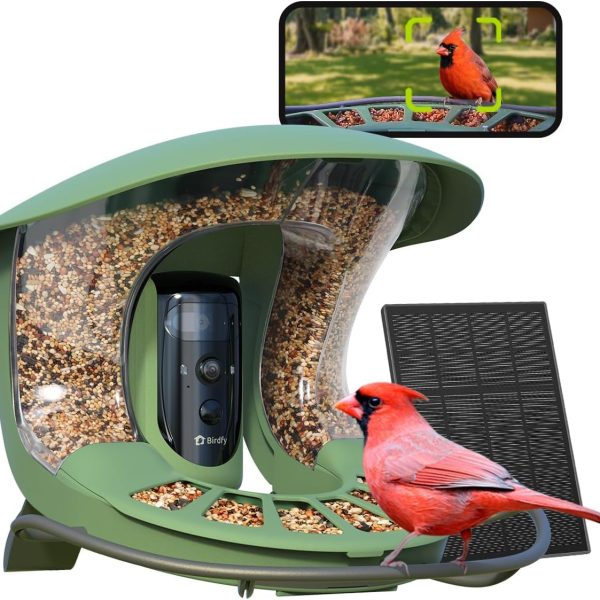
The essentials
Birdfy Feeder 2 Pro specifications.
The official specifications distinguish Pro from the standard Feeder 2 and Duo.
| Feature | Listed for Feeder 2 Pro |
|---|---|
| Camera | Upper lens: 2K; lower lens: 1080p |
| Companion app & network | Birdfy · 2.4GHz Wi-Fi · no Bluetooth pairing |
| Battery & solar accessory | 9,000mAh rechargeable battery; included 3W solar panel |
| Feeder capacity | 2.5L / 42.3 oz seed bin |
| Weather rating & operating range | IP66 · 14°F to 113°F (−10°C to 45°C) |
| Local card recording | No microSD playback; product FAQ specifies cloud-only storage |
Two views of a visit
What do the two lenses do?
The product FAQ describes a moving portrait lens above a fixed wide-angle lens. It says the app receives both video views without AI recognition enabled. AI recognition can also produce selected bird photos.
That makes the Pro worth considering when your interest is the bird and the wider activity around it. Ask for sample footage of both views from the same visit. A portrait crop can be useful for observing detail; a wider view gives context when more than one visitor arrives.
We have not measured sharpness, tracking success or AI accuracy. Compare downloaded samples from the exact camera rather than assuming the extra lens guarantees a better result in every garden.
Read the edition name
Does Birdfy Feeder 2 Pro need a subscription?
For identification, distinguish the product's Lifetime AI option from a subscription-based purchase. Save the edition name with your order instead of relying on a photograph of the feeder.
The newer membership system has Free, Plus and Pro account levels. It says existing Lifetime AI remains usable. Membership Pro is a plan name; Feeder 2 Pro is a hardware name. Buying the latter does not, by itself, establish that you have the former.
Check the actual entitlement.
Record whether recognition is included with this purchase, which device it covers and what the app shows after pairing. Longer recordings and archive capacity are separate questions.
For a wider list of cameras and free features, use our no-subscription buying guide. Choose the feature you need included before comparing the final checkout price.
Make a plan for favorite clips
Can Feeder 2 Pro save videos to a microSD card?
No: its storage FAQ describes cloud-only recording and a 30-day retention window. Download a clip you want to keep; a rolling history is not a permanent archive.
Test the whole workflow after setup: find a recording, download it, open the downloaded file and decide where your backup will live. If local-card recording is a requirement, settle that before purchasing rather than planning to add a card later.
Do not use battery capacity to infer offline recording support. For a camera at a location without internet, get explicit model-specific confirmation of recording, playback and app access.
Before permanent mounting
How do you set up Birdfy Feeder 2 Pro?
Use the official pairing instructions for the full procedure. This checklist highlights the decisions to get right:
- Choose the correct device. In Birdfy, add Feeder 2 Series and choose Cam 2 Pro. Scan the QR code on the camera's back.
- Check the network. Use 2.4GHz Wi-Fi and verify its password. Pairing mode uses a flashing blue light; follow the app and official button sequence.
- If the phone QR code will not scan: remove the lens film, increase screen brightness and adjust the phone distance.
- Test at the intended location. Check live view and a saved clip before fixing the mount in place. Keep charging and cleaning access in mind.
- Check account benefits. Confirm the selected AI entitlement and try exporting a recording.
If pairing stalls, the manufacturer recommends checking the password, network band and signal. For a black screen on one lens, follow its restart instructions and contact Birdfy if it persists.
Choose the hardware you will use
Feeder 2, Feeder 2 Pro or Feeder 2 Duo?
In the series table, the standard model has a 1080p camera, Pro has two lens resolutions, and Duo adds a side camera. Solar accessories also differ.
Start with the view you actually want to watch. If one angle answers your needs, compare a simpler model's complete bundle cost. If a second camera angle is the reason you are upgrading, compare Duo rather than assuming the Pro's two lenses provide the same placement flexibility.
For an alternative app experience, read Birdfy vs Bird Buddy. For more Birdfy candidates, browse the camera collection.
A few final checks
Feeder 2 Pro: common questions.
Does it support 5GHz Wi-Fi?
The cited Pro specifications list 2.4GHz. Do not buy it for a 5GHz-only installation.
Will the solar panel eliminate manual charging?
Plan for access to the camera. We have not measured runtime at your location, and included solar hardware does not establish uninterrupted charging in shade or winter.
Is this a hands-on review?
No. It is a buying and setup guide based on official documents. We have not tested recording quality or reliability.
Check the details at the source
Sources, scope & update date.
Official documents checked October 17, 2026. Our recommendations interpret those documents. Promotional prices and performance scores are omitted; verify the current model, selected edition and account benefits before ordering.
- Feeder 2 Series specifications — Pro hardware and differences within the range.
- Feeder 2 Pro product FAQ — lenses, AI edition and cloud-only storage.
- Birdfy Membership — plans and continuing Lifetime AI.
- Camera pairing — device selection, QR code and Wi-Fi checks.
- Feeder 2 Series troubleshooting — one-lens black-screen procedure.
Confirm the selected AI edition and included accessories before ordering.